Measuring land used to require long measuring tapes or surveying equipment. Today, various apps use GPS and digital maps to estimate area and perimeter directly from your cell phone.
These tools are not a substitute for professional measurements, but they can help with quick estimates for planning or initial land assessment.
In this article, we analyze three apps available for Android and iPhone that allow you to calculate areas using your smartphone.
How area measurement apps work
Before looking at the applications, it's worth quickly understanding the technical principle.
These tools primarily utilize:
Cell phone GPS
It records geographic points around the terrain.
Digital or satellite maps
They allow you to manually mark the boundaries of the area.
Geometric algorithms
They transform the recorded points into a polygon and automatically calculate:
- total area
- perimeter
- distance between points.
Accuracy depends on factors such as GPS quality, area size, and obstacles at the location.
1. GPS Fields Area Measure

Area and Distance Meter
One of the best-known applications for external measurements is... GPS Fields Area Measure.
It is frequently used to estimate agricultural areas, rural land, or urban lots.
Practical test
System tested
Android 13
Mid-range smartphone
Loading time
Between 2 and 3 seconds after opening the app.
Navigation structure
The interface presents three main actions:
- start measurement
- mark points on the map
- View area calculation.
The app allows you to measure in two ways:
- by tapping on the points directly on the map.
- Walking around the area while the GPS records the route.
Free version review
The free version allows for full measurements and features occasional ads.
Average rating in stores (March 2026): above 4 stars.
User feedback
Common compliments:
- ease of use
- Good functioning in open areas.
Frequent criticisms:
- Variation in accuracy in locations with weak GPS signal.
2. AR Plan 3D

RA Plan 3D: Tape measure house
Another interesting approach appears in AR Plan 3D, which uses augmented reality to calculate areas using the cell phone camera.
How it works
The app detects surfaces as the user moves the camera through the space. From this, it creates virtual measurements between the points.
It is mainly used for:
- measuring indoor environments
- estimate room area
- plan renovations or layout.
Practical test
System tested
iPhone with iOS 17
Android with ARCore support.
Opening time
Between 3 and 4 seconds.
User experience
The user points the camera at the corners of the space and marks the points on the screen.
The app calculates automatically:
- length of the walls
- perimeter
- total area.
Free version review
It allows for basic measurements. Some advanced features are only available in paid plans.
Average rating (March 2026): better than 4 stars.
Limitations observed
- dependence on good lighting
- Reduced accuracy on very smooth or reflective surfaces.
3. Land Area Calculator
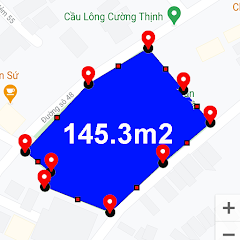
Land area measurement
Another application used to estimate areas is... Land Area Calculator.
It combines GPS measurement with manual map marking.
Practical test
System used
Android 12
Smartphone with standard GPS.
Opening time
Approximately 2 seconds.
Application structure
Navigation follows a simple model:
- open map
- mark points on the terrain
- View automatic calculation.
The app also allows you to convert measurements between different units, such as:
- square meters
- hectares
- acres.
Free version
The free version includes light ads between some measurements.
Average rating (March 2026): approximately 4 stars.
Frequent user comments
Positive points mentioned:
- simple interface
- Quick estimates.
Common criticisms:
- Limited accuracy in very large areas.
When to use apps to calculate land area
This type of application is usually useful in situations such as:
- Estimate the size of land before a negotiation.
- plan fences or space divisions
- assess small agricultural areas
- Calculate space on rural properties.
They work best when the goal is get a quick estimate.
Important limitations
GPS-based measurement applications have some limitations.
Accuracy may vary depending on:
- satellite signal quality
- presence of trees or buildings
- size of the area measured.
Therefore, official measurements or technical projects still depend on professional surveying equipment.
Comparison between apps for measuring land area.
Each app uses a different method to calculate area. Some rely primarily on GPS, while others use the phone's camera and sensors.
GPS Fields Area Measure
Main method: GPS and map
Most commonly used for external measurements, especially rural land and agricultural areas. Allows you to walk around the area or manually mark points on the map.
Points observed during use
- good performance in open areas
- simple navigation
- Quick perimeter calculation.
Main limitation: accuracy depends on the quality of the GPS signal.
AR Plan 3D
Main method: camera and augmented reality
This app uses the phone's sensors and camera to measure environments.
It is most commonly used for:
- measure rooms
- Calculate the area of interior spaces.
- Renovation planning.
Points observed
- intuitive visualization
- Quick measurements in indoor environments.
Limitation: depends on adequate lighting and AR-compatible sensors.
Land Area Calculator
Main method: GPS with manual marking
This app combines manual map marking with automatic area calculation.
It is mainly used for:
- to estimate urban land values
- To calculate small areas.
Points observed
- simple interface
- Integrated unit conversion.
Limitation: lower precision in very large areas.
Frequently asked questions about apps for calculating land area.
1. Can a cell phone really measure land?
Yes. Apps use GPS or smartphone sensors to record points on the map and automatically calculate the area. The result is an estimate based on this data.
2. Do these apps work without internet access?
Some functions may work offline, especially when using GPS. However, maps and satellite imagery generally require an internet connection.
3. Is the measurement taken by the cell phone accurate?
Accuracy can vary. In open areas with a good GPS signal, the result is usually more consistent. Obstacles such as buildings or trees can interfere with the calculation.
4. Which app works best for large plots of land?
GPS-based applications, such as GPS Fields Area Measure, They tend to handle larger outdoor areas better.
5. Do measurement apps replace professional surveying?
No. These apps are useful for quick estimates, but legal measurements or technical projects require professional equipment.
Conclusion
Measurement apps have transformed the cell phone into a useful tool for area estimation. Using GPS, digital maps, or augmented reality sensors, they can calculate the dimensions of land and environments in just a few steps.
Tools such as GPS Fields Area Measure, AR Plan 3D and Land Area Calculator They show how different technologies can be used for this type of calculation.
While they don't replace professional measurements, these apps can be helpful in various everyday situations, especially when the goal is to quickly estimate the size of a plot of land or space.
To explore each tool in more detail, use the buttons in the article and access the download page in your device's official app store.